On this page · 11 sections
- What does pre-grading mean?
- What do you need to pre-grade a card?
- How do you check a card's centering?
- How do you check the corners?
- How do you check the edges?
- How do you check the surface?
- How do you turn the four checks into a grade?
- Should you send the card in?
- Where to go next
- Pre-grade with CollectorDream
- FAQ
Updated: October 29, 2026
Pre-grading means checking a card the way a grader would before you pay to send it in. This guide shows you how to pre-grade cards at home with a ruler, a light and a loupe: how to measure centering and compare it with the published limits at PSA, CGC and TAG, and what to look for on the corners, edges and surface. It works the same for Pokémon, One Piece, Yu-Gi-Oh!, Dragon Ball and Lorcana cards.
Check | Tool | What a 10 looks like | Common problems |
|---|---|---|---|
Centering | Ruler in millimeters, or a photo you can measure | Front borders within about 55/45 | Picture shifted to one side, or tilted |
Corners | 10x loupe | Four sharp, square corners, front and back | White specks, fraying, a soft or rounded tip |
Edges | Loupe, dark background | Clean, smooth edges | Whitening on colored backs, chipping, rough cuts |
Surface | One bright light, tilted | Full gloss, no marks | Scratches, print lines, dents, fingerprints, haze |
10-grade centering: PSA, CGC and TAG, checked Oct 29, 2026.
What does pre-grading mean?
Pre-grading is an honest look at a card's condition before you pay a grading fee. You check the same four areas the graders publish standards for, and you decide whether the card has a real chance at the grade you need.
It saves money in two ways. You skip fees on cards that would come back as a 7 or 8, and you choose the right grader and tier for the few that look clean. Our PSA vs CGC vs TAG vs BGS comparison has the fees and scales side by side.
What do you need to pre-grade a card?
You don't need special equipment:
- A bright light. A desk lamp or a phone flashlight. One light source shows surface marks better than a bright, evenly lit room.
- A loupe or magnifier. 10x is a good choice: CGC, for example, defines its Pristine 10 as flawless under 10x magnification (CGC).
- A ruler marked in millimeters, or your phone's camera so you can zoom into a straight-on photo.
- A clean, soft surface such as a playmat, and a dark cloth or sheet of paper to set the card on when you check its edges.
- Clean, dry hands. Hold the card by its edges.
How do you check a card's centering?
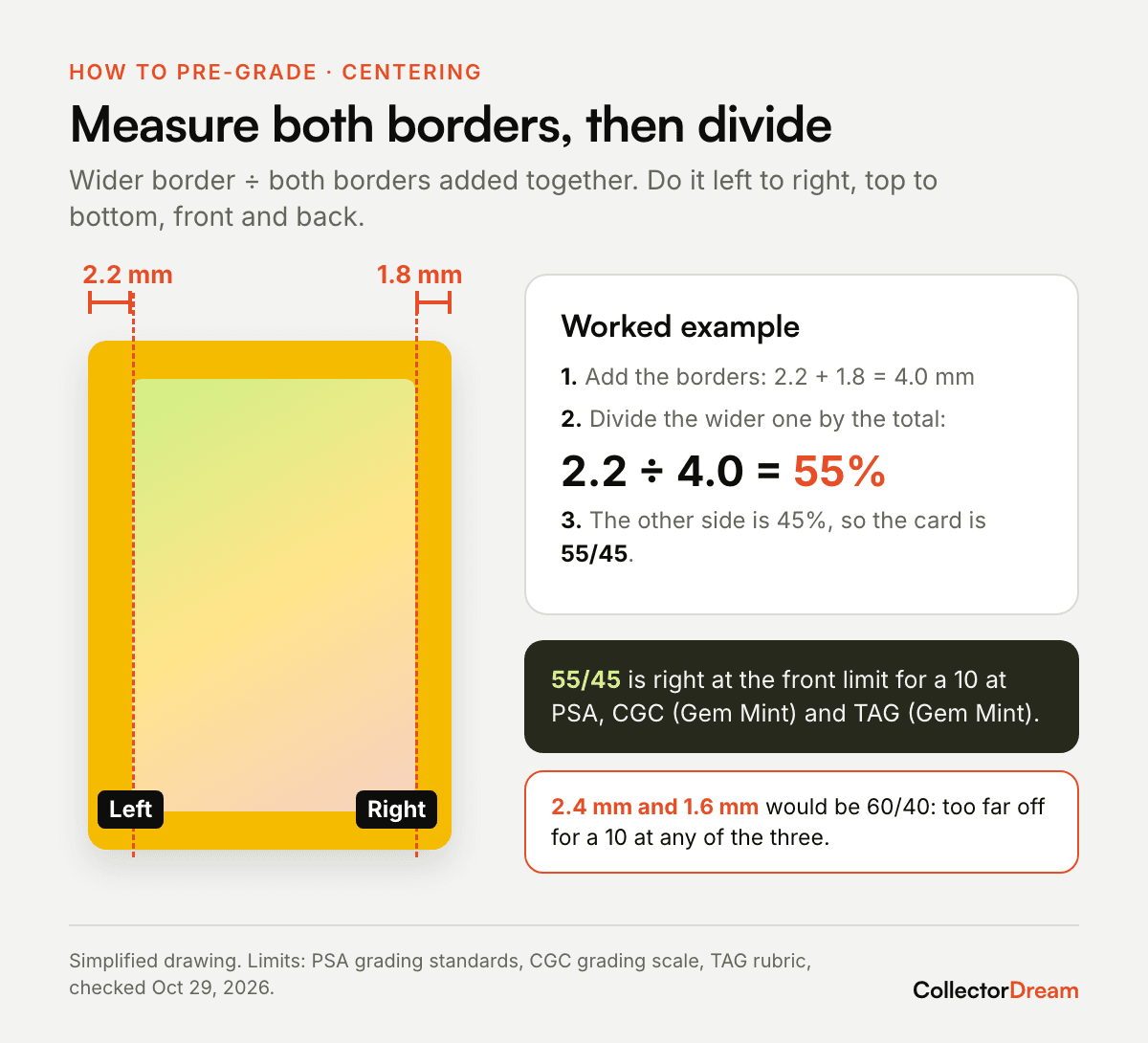
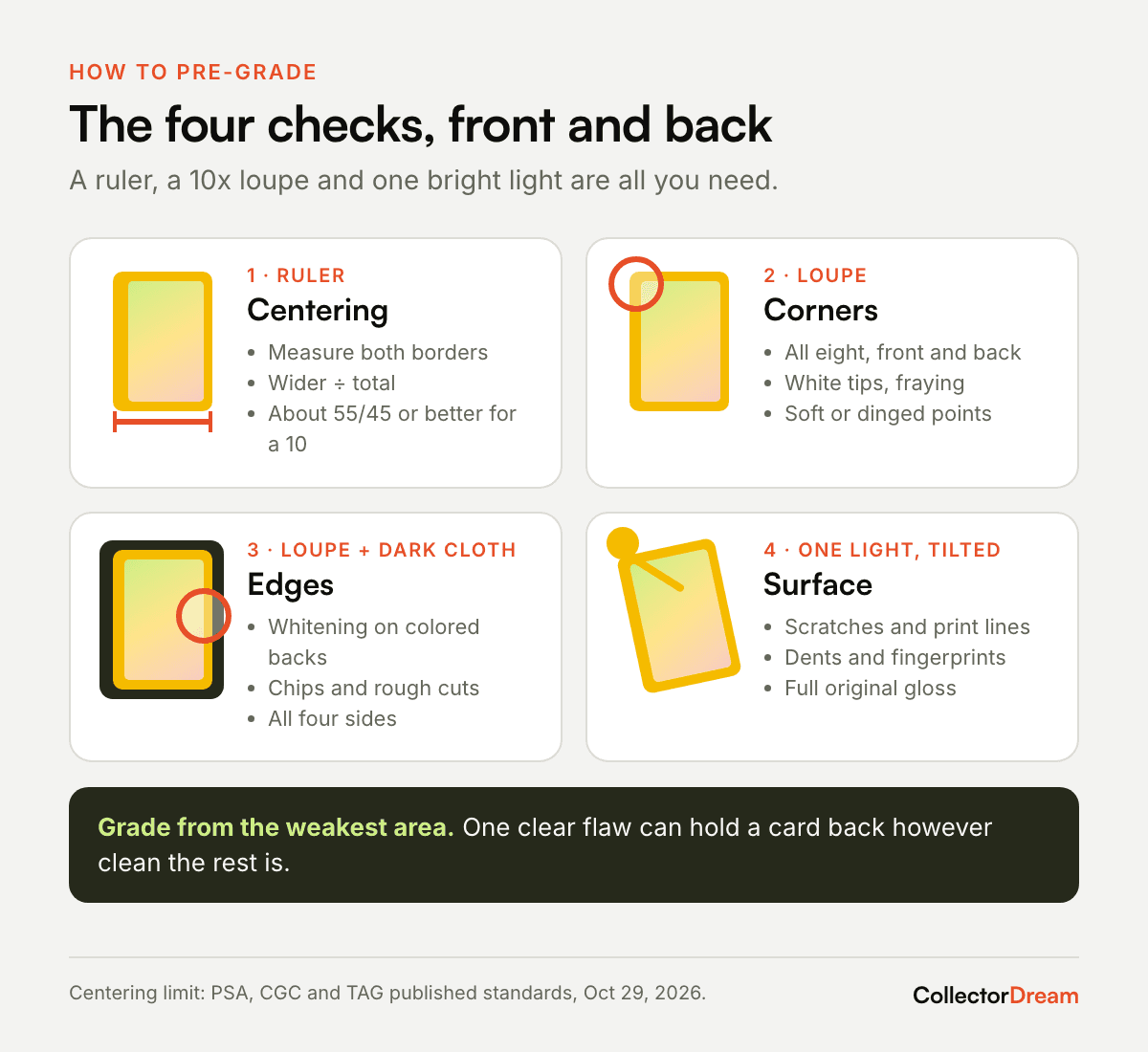
Measure the border on each side, then divide the wider border by the two borders added together. That gives you the centering split for that direction.
- Lay the card flat and look straight down, or take a photo straight on.
- Measure the left and right borders, from the card's edge to the edge of the picture frame.
- Divide the wider border by the total. Do the same for top and bottom.
- Turn the card over and repeat for the back.
Worked example. The left border is 2.2 mm and the right is 1.8 mm. The total is 4.0 mm, and 2.2 ÷ 4.0 = 0.55, so the card is 55/45 left to right. That's right at the front limit for a 10 at PSA, CGC and TAG. If the borders were 2.4 mm and 1.6 mm, the card would be 60/40: too far off for a 10 at any of them.
Use the worse of the two directions. A card that's 50/50 left to right but 58/42 top to bottom is a 58/42 card.
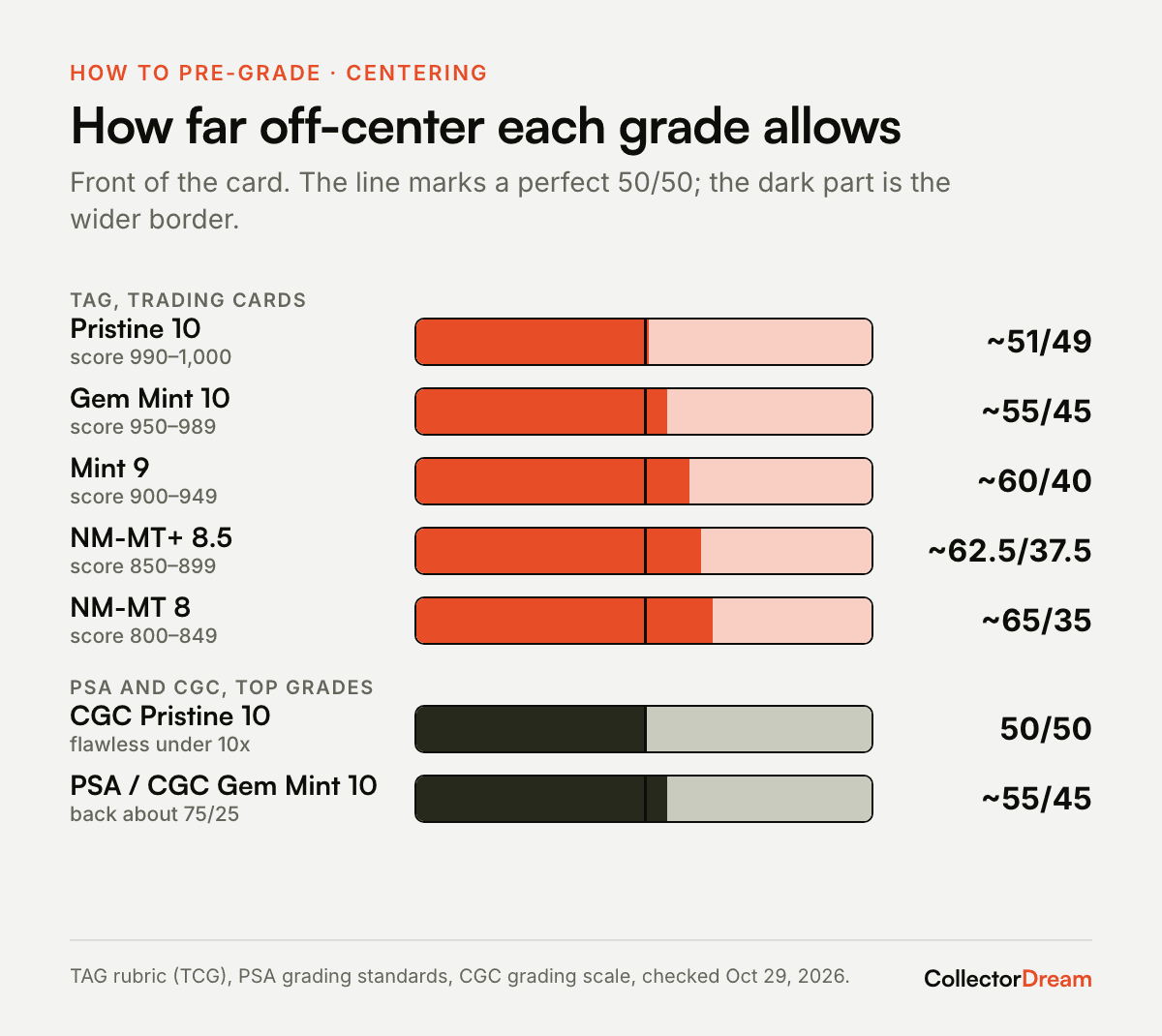
Here's what each grader publishes for its top grades:
Grader and grade | Front | Back |
|---|---|---|
PSA Gem Mint 10 | about 55/45 | about 75/25 |
CGC Pristine 10 | 50/50 | — |
CGC Gem Mint 10 | about 55/45 | about 75/25 |
TAG Pristine 10 | about 51/49 | about 52/48 (TCG cards) |
TAG Gem Mint 10 | about 55/45 | about 65/35 (TCG cards) |
TAG Mint 9 | about 60/40 | about 75/25 (TCG cards) |
TAG NM-MT+ 8.5 | about 62.5/37.5 | about 85/15 (TCG cards) |
TAG NM-MT 8 | about 65/35 | about 95/5 (TCG cards) |
Sources: PSA grading standards, CGC grading scale, TAG rubric, checked Oct 29, 2026. PSA notes that a grader may allow a small variance for a card's overall eye appeal.
Two things stand out. The back matters more at TAG than at PSA or CGC: a 70/30 back is fine for a PSA 10 but too far off for a TAG Gem Mint 10. And TAG has no 9.5, so a card that misses its 10 lands on a 9 or below (TAG scale).
How do you check the corners?
Look at all eight corners, four on the front and four on the back, under the loupe. A 10 needs every one of them sharp and square. CGC describes Gem Mint 10 corners as perfect to the naked eye (CGC), and TAG allows only minor fill or fray that shows up in high-resolution imaging (TAG).
What lowers a corner:
- White specks or a white tip, where ink has worn off the point. It's easiest to see on cards with dark or colored backs.
- Fraying, tiny loose fibers at the tip.
- A soft or rounded corner, even a slight one.
- A ding, where the corner is bent or pressed in.
Check the back corners as carefully as the front. Cards often pick up wear on the back from sliding across a table or a binder page.
How do you check the edges?
Run the loupe along all four edges, front and back, with the card on a dark background. You're looking for whitening (small white chips along a colored border), chipping, and edges that look rough or wavy from the cut. Whitening is the one to watch most closely, and it shows most clearly on a colored back.
TAG's Gem Mint 10 allows an edge with minor fill or fray (TAG). Anything you can see without the loupe is likely to cost the card its 10.
How do you check the surface?
Hold the card under one bright light and tilt it slowly, front and back, so the light glances across the surface. Scratches, dents and print lines that are invisible straight on show up as bright lines or shadows at an angle.
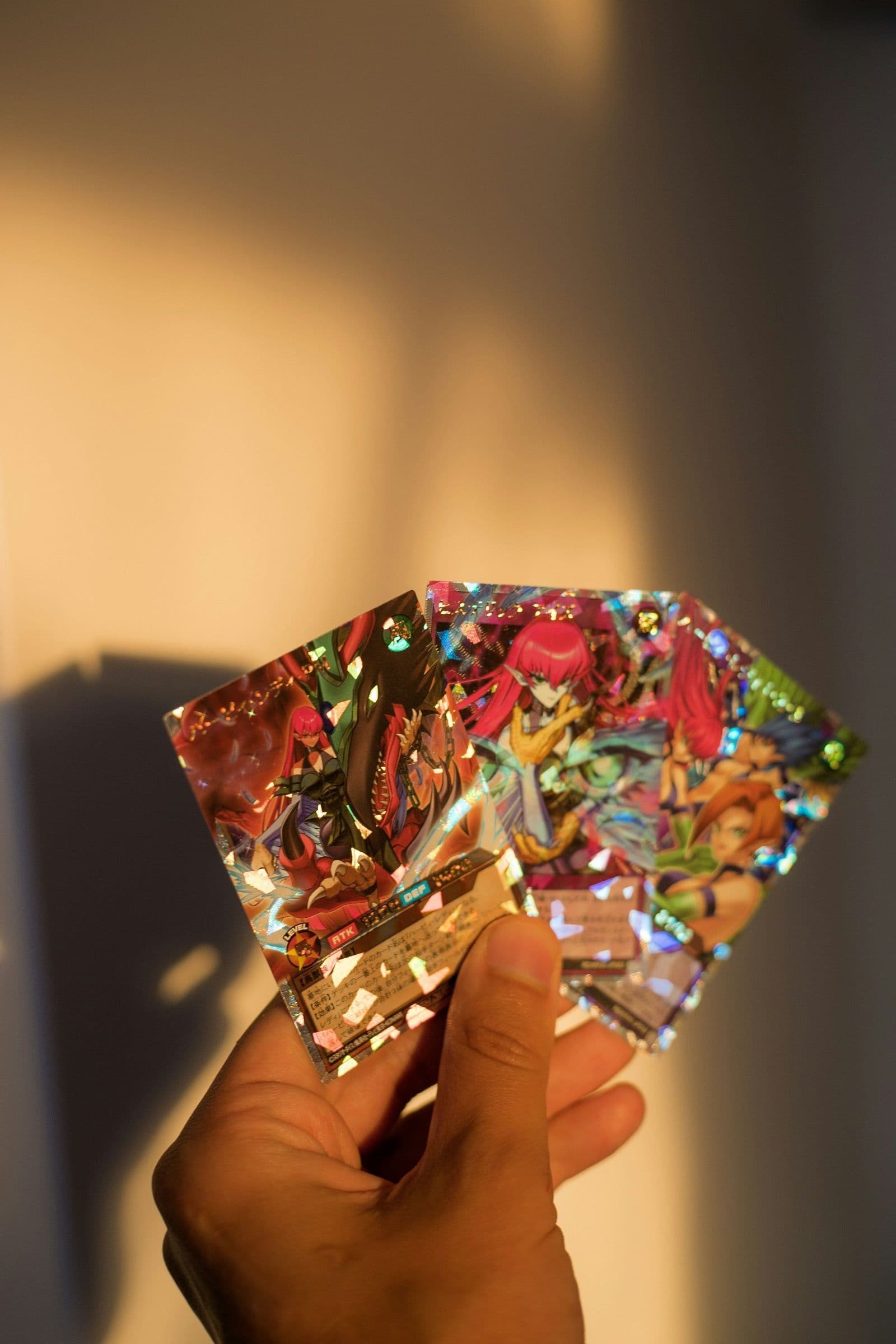
Look for:
- Scratches, especially on holofoil and textured cards, where they catch the light.
- Print lines, thin straight lines from the printing process. They count even though they came from the factory: TAG's Gem Mint 10 allows only a light one (TAG).
- Dents and indentations, which show as small shadows when you tilt the card.
- Fingerprints, smudges or haze.
- Loss of gloss. A Gem Mint card should have its full original shine; CGC asks for perfect gloss at that grade (CGC).
Don't try to clean a card with liquids or polish. If you want to remove dust or a light fingerprint before you sleeve it, use a dry, clean microfiber cloth and very little pressure.
How do you turn the four checks into a grade?
Start from the weakest area. Graders give one overall grade, but their definitions set a limit for each area, so a single clear flaw (a soft corner, a line of whitening, a scratch across the holo) can keep a card out of a grade however clean the rest is.
A simple way to sort your cards:
What you found | Likely range | What to do |
|---|---|---|
Centered within about 55/45 front, nothing visible under the loupe | Candidate for a 10 | Worth considering for grading |
Centering between about 55/45 and 60/40, or one tiny flaw only the loupe shows | Likely a 9 | Grade only if a 9 is worth the fee to you |
A flaw you can see without the loupe | 8 or lower | Usually keep it raw |
Ranges are a rough guide built from the published centering limits above, not a grader's promise.
Write your notes down for each card, including which side and which corner. If the card comes back from a grader, compare. Your pre-grades will get more accurate with every submission. PSA's Express tier and above also return Grader Notes that explain the defects behind a grade, which helps you calibrate (PSA).
Should you send the card in?
Pre-grading tells you the card's likely grade. Whether it's worth sending depends on what the card sells for raw and at that grade, and on the fee. For a worked break-even test, see is it worth grading One Piece cards; the same math works for any game.
If you do send it, put it in a fresh penny sleeve and a semi-rigid holder, and follow your grader's packing instructions. Sleeve sizes differ by game, and Yu-Gi-Oh! cards need smaller sleeves: our card sleeve sizes by game guide has the measurements.
Where to go next
- PSA vs CGC vs TAG vs BGS (fees, turnaround and which games each accepts)
- Is It Worth Grading One Piece Cards in 2026? (break-even test)
- Card Sleeve Sizes by Game
- How to Start Collecting Trading Cards
Pre-grade with CollectorDream
CollectorDream already lets you scan a card, record its condition and see recent sold prices, raw and graded. AI pre-grading is coming soon: you'll be able to photograph a card and get a read on its centering and condition before you decide whether to pay for grading. The app is out now on iOS: download CollectorDream on the App Store, and follow my daily openings on YouTube, TikTok and Instagram.
FAQ
What does it mean to pre-grade a card?
It means checking a card's centering, corners, edges and surface yourself, using the graders' published standards, to estimate its grade before you pay to have it graded.
What centering do you need for a PSA 10?
About 55/45 or better on the front and 75/25 or better on the back, according to PSA's grading standards. PSA says a grader may allow a small variance for eye appeal.
Can I pre-grade cards with my phone?
Yes, for centering: take a photo straight on, zoom in and measure the borders. For corners, edges and surface, a 10x loupe and a tilted light show much more than a phone screen.
Does pre-grading guarantee a grade?
No. It's an estimate. Graders look under magnification and high-resolution imaging, and some flaws are hard to see at home.
Should I clean a card before grading?
Don't use liquids or polish. A dry microfiber cloth with light pressure is enough to remove dust before you sleeve it.
Which grader is strictest on centering?
For a 10, PSA, CGC and TAG all allow about 55/45 on the front. On the back, TAG is stricter for trading cards (about 65/35 against 75/25). For their Pristine 10s, CGC asks for 50/50 and TAG about 51/49.
Alec Nguyen
Founder, CollectorDream
Scan a card, see its rarity and value
The CollectorDream app reads the card for you. Now on the App Store.
Download on iOS (opens the App Store)